Koma — Offline Manga Reader for iPad
A native Swift/SwiftUI iPad app — 6 archive formats, right-to-left page turns, cross-volume reading, fully offline.
 SwiftSwiftUIPersonal Project
Overview
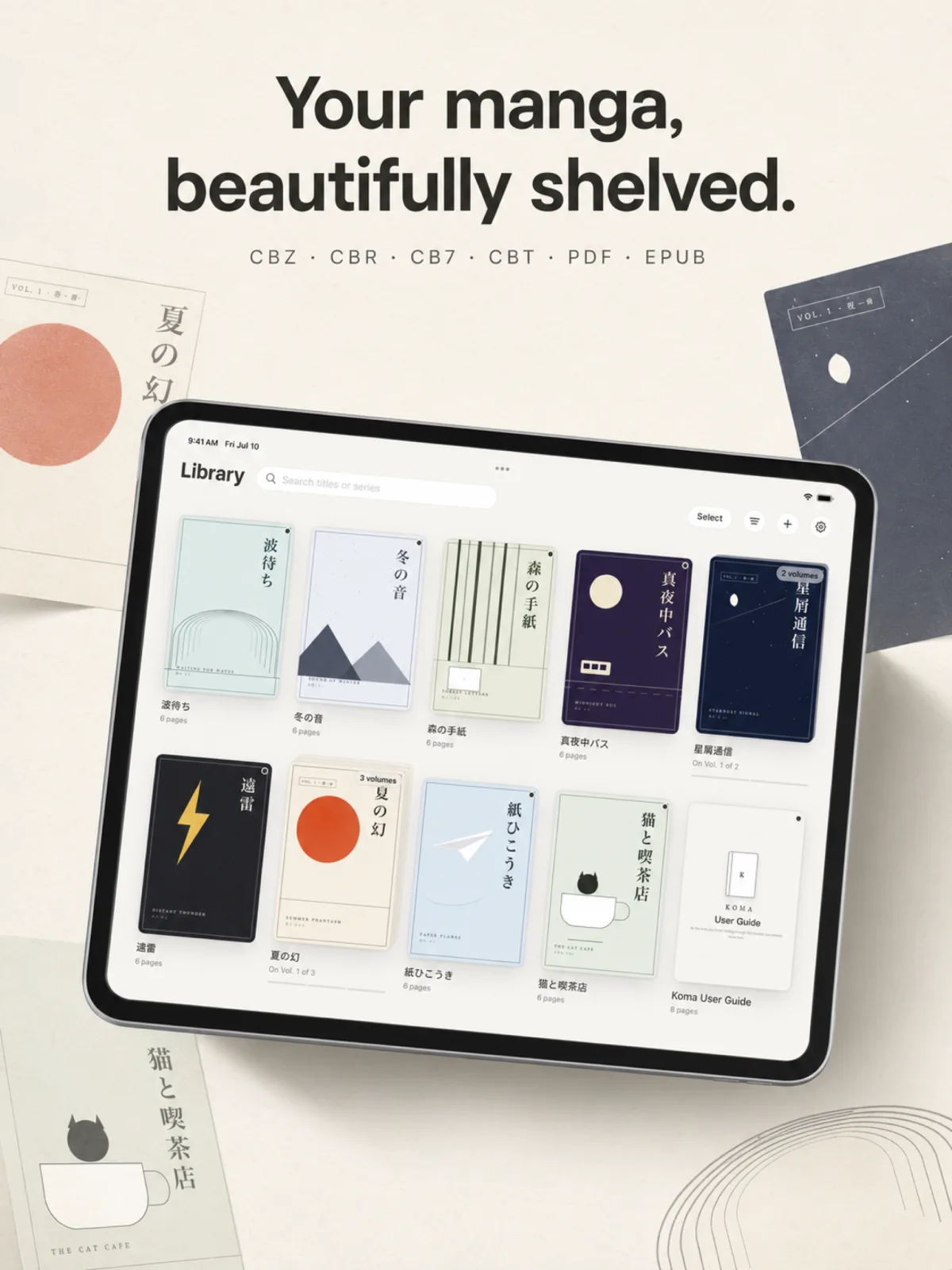
Koma is an iPad-only manga reader I designed and built solo, from the archive engine to the App Store assets. It opens CBZ, CBR, CB7, CBT, PDF and image EPUB by magic-number detection, reads right-to-left with true two-page spreads, flows across volumes, and never touches the network — zero tracking, zero data collection.
Why build another manga reader
I wanted a reader that treats manga the way Apple Books treats books: open the file you already have, remember where you were, and get out of the way. Most readers on the store either force a cloud account, plaster the shelf with ads, or fumble right-to-left reading. Koma is fully offline by design — the privacy manifest declares zero tracking and an empty data-collection list, because there is genuinely nothing to declare. Files open in place via security-scoped bookmarks, so your library is never copied or uploaded anywhere.
An archive engine with two dependencies
Koma opens six formats — CBZ/ZIP, CBR (RAR), CB7 (7z), CBT (TAR), PDF and image EPUB — plus plain image folders. The ZIP and TAR extractors are written from scratch; PDF renders on demand through PDFKit as vectors, and EPUB is parsed from the OPF spine so page order is authoritative. Only RAR and 7z pull in libraries (Unrar.swift and SWCompression), because those algorithms can't reasonably be rewritten. Every file is identified by magic numbers, not extension — a mislabelled archive still opens. Nothing is ever fully extracted: pages decompress one at a time, on demand.
Reading like a real book
Paged mode rides on UIPageViewController for the system-native, interruptible page-turn feel, and supports both right-to-left (manga) and left-to-right reading. At import, Koma probes each page's dimensions with partial extraction — sub-second, without unpacking the archive — so wide spread pages are known ahead of time and get the full screen in two-page mode, with a binding toggle to shift pairing when the cover stands alone. Finish a volume and the next one flows in; page back from page one and you land on the previous volume's last page. Webtoon mode is a separate UICollectionView path: heights are pre-known from the size cache, so image loading never shifts the layout.
Performance as a feature
Manga scans are big — a 2000×3000 page decoded naively costs ~24 MB before it ever reaches the screen. Koma downsamples straight to target size through ImageIO, so the same page lands in memory at a few megabytes, and only decodes the high-resolution version when you actually zoom in. The page cache is an NSCache with a real byte budget (a fifth of physical memory) that empties itself on memory warnings. Small touches carry the same attention: rubber-band resistance when page-turning from a zoomed state, and a vertical-swipe brightness dimmer in webtoon mode.
The ink-and-paper design system
The UI is monochrome on purpose: warm paper white in light mode, charcoal ink in dark, hairline strokes for layering, serif navigation titles because a book app deserves a little bookishness. Colour is reserved for meaning — warnings and destructive actions only. Reader toolbars float as rounded capsules instead of spanning edge to edge: the manga is the protagonist, the chrome is a guest. The reading surface itself stays pure black in both modes. A four-language user guide (English, 日本語, 简体中文, 繁體中文) ships inside the app — as a manga-format CBZ that lands on your shelf at first launch.
Tech stack
About 5,800 lines of Swift 5.10, iPad-only, iOS 17+. SwiftUI drives the shelf and library; UIKit takes over where feel matters — UIPageViewController for paged reading, UICollectionView for webtoon scrolling — with SwiftUI floating back on top for the toolbars. State uses the iOS 17 @Observable model, the project is generated from a version-controlled project.yml via xcodegen, and unit tests cover the archive backends, filename parsing, spread layout and reading direction. Everything is App Store-ready: privacy manifest, string catalogs (English and Japanese UI), and a full set of 2064×2752 marketing screenshots.